
In experimentation, there is a dangerous tendency to oversimplify success. We look at the primary metric—usually Conversion Rate or Revenue Per Visitor—and we judge a variant as a "Winner" or a "Loser."
But "Loser" is a label, not an explanation.
If Variant B dropped conversions by 10%, do you know why? Did the users hate the new copy? Did they get confused by the layout? Or did a JavaScript conflict prevent the "Add to Cart" button from working on mobile devices?
If you are only tracking the final conversion, you are flying blind.
As specialists in precision tracking, we find that the difference between a failed test and a valuable insight often lies in the data architecture. By setting up advanced Custom Event tracking, we can measure user intent, friction, and consumption—giving us the "why" behind the result.
Here is how to move beyond basic metrics and architect a data layer that tells the whole story.
1. Tracking Interaction: The "Intent" vs. "Outcome" Gap
Many experiments involve adding interactive elements—calculators, product configurators, or quizzes.
A common scenario: You add a "Loan Calculator" to a landing page. Conversions drop. You assume the calculator is a distraction and remove it.
The Missing Data: What if engagement with the calculator was incredibly high, but the "Apply Now" button below it was pushed below the fold, or the user felt satisfied with the calculation and planned to return later?
You need to track the interaction state, not just the page view.
The Code Pattern: Don't just track clicks; track meaningful input. Here is how to push an event when a user actually utilizes a tool:
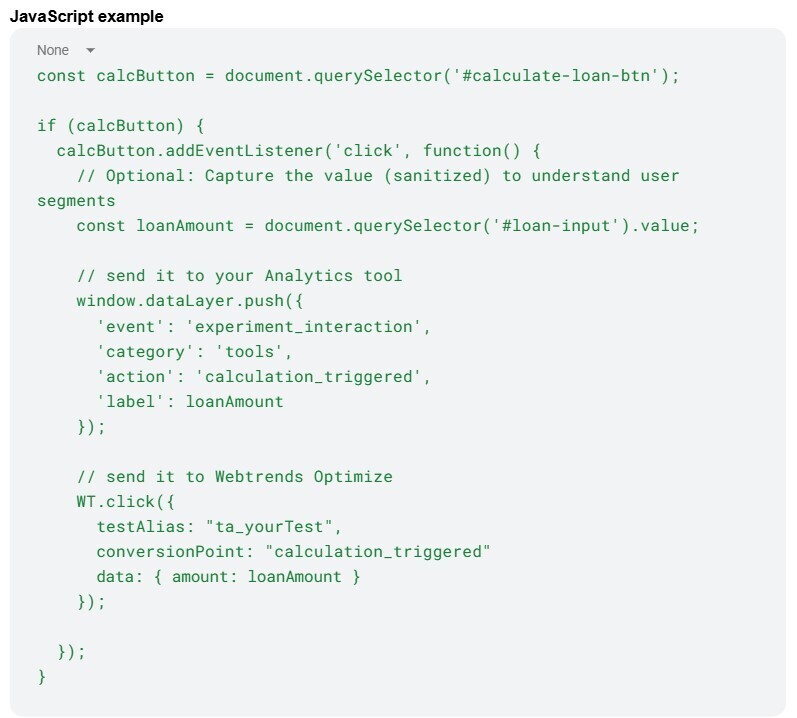
By tracking this interaction, you can segment your report: "Did users who used the calculator convert at a higher rate than those who didn't?" and segment users based on the actual loan amount to understand differences.
2. Tracking Friction: The "Canary in the Coal Mine"
This is the most critical safety net in experimentation. Sometimes, a variant introduces a silent error—a validation loop that won't close, or a conflict with a third-party chat widget.
If you rely solely on general analytics to catch this, you are subject to data latency. You might not see the dip in performance for 24 to 48 hours.
The Webtrends Optimize Advantage
One of Webtrends Optimize's strongest features is its near-instant reporting interface. We can leverage this speed to create a "Kill Switch." By tracking client-side errors effectively, you can see a spike in error events in the Webtrends dashboard minutes - or even seconds - after launch.
The Code Pattern: Whatever your script does, include error handling and log these errors to Webtrends Optimize, so that you can follow them in real-time and get detailed logs to potentially debug them.
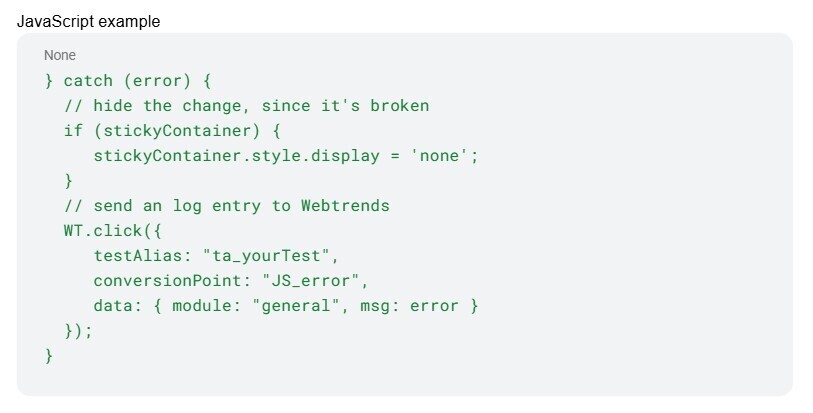
The Strategy: When you launch a complex test, keep your Webtrends Reporting tab open. If JS_error events spike, you don't need to guess—you roll back immediately.
3. Tracking Consumption: Scroll Depth (Without the Lag)
For content experiments (e.g., Long-form vs. Short-form copy), "Time on Page" is notoriously inaccurate. You need scroll depth.
However, a sloppy tracking script can ruin an experiment. If your script fires an event for every pixel scrolled, you will cause "jank" (stuttering) on mobile devices. If the variant feels slow, the user leaves—and your data is corrupted by performance issues.
The Code Pattern: Always use Throttling or requestAnimationFrame to limit how often the browser checks the scroll position.
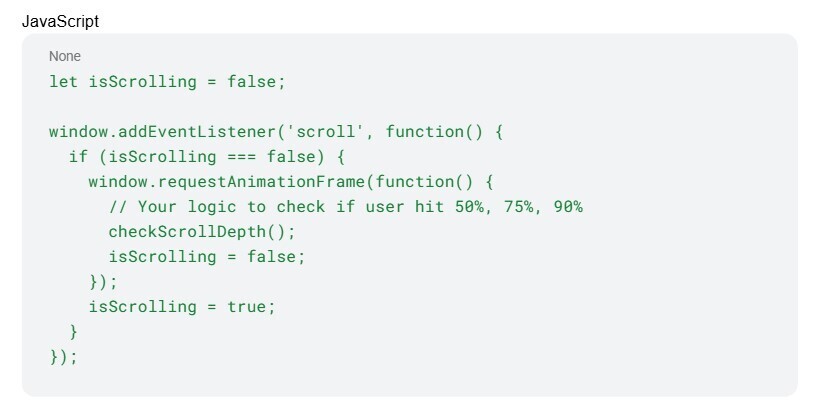
This ensures your tracking remains invisible to the user experience.
Conclusion
Precision tracking isn't just about gathering more data; it's about gathering better data.
By auditing your data layer and setting up these "listening posts" before you launch, you ensure that every experiment yields a clear result. Whether the test wins or loses, you will know exactly how the user behaved, where they struggled, and why they made their decision.
That is the difference between guessing and experimenting.